Coming soon to the Chrome Web Store
Know your FBA profit before you buy
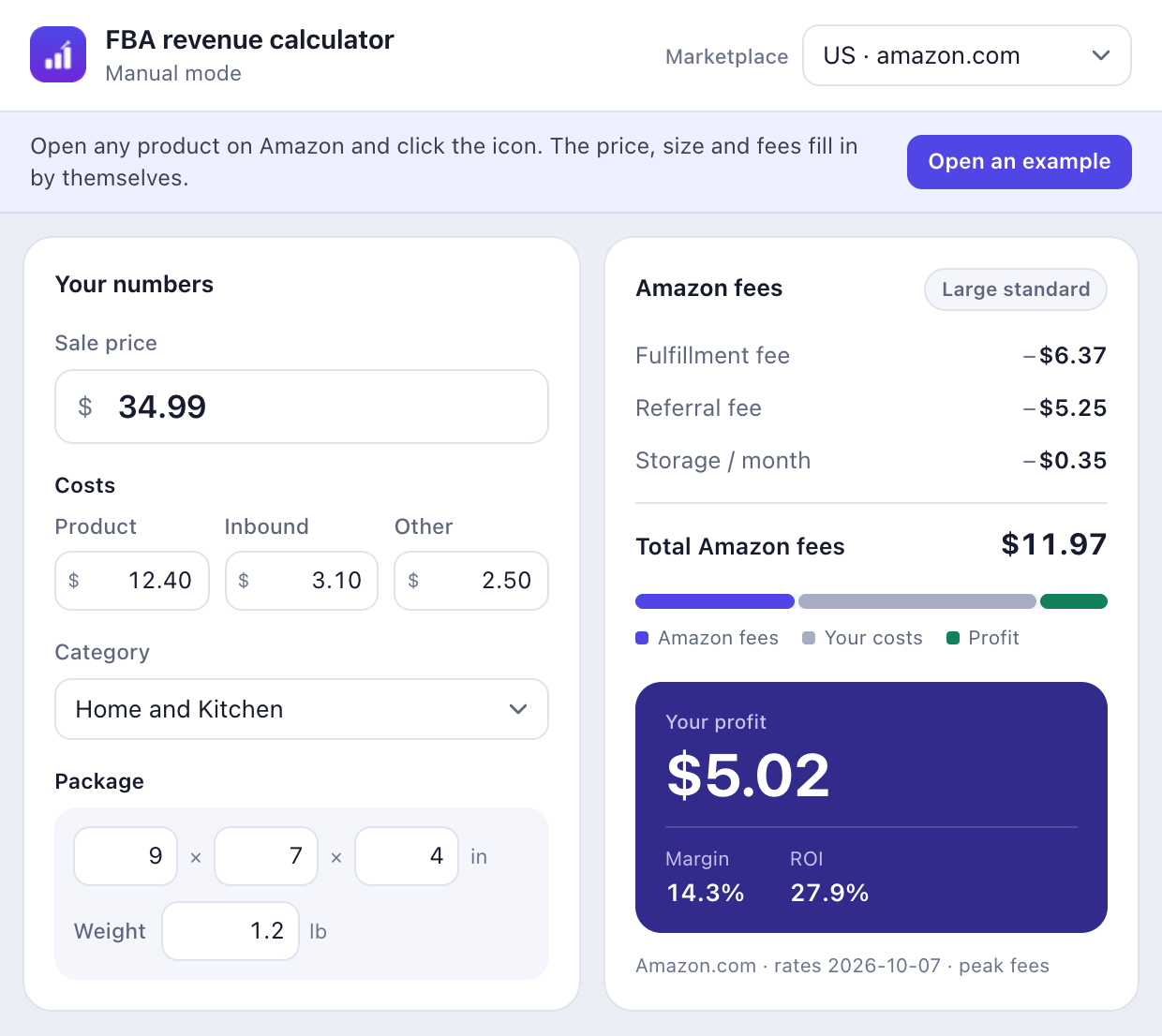
FBA Revenue Calculator reads an Amazon product page and shows the fees, storage, VAT, profit, margin and ROI — in the marketplace’s own currency and units.
-
On the page, not another tab.
Fees and profit appear under the product title while you browse.
-
18 marketplaces.
From amazon.com to amazon.com.br, in each store’s own currency and units.
-
Nothing leaves your browser.
No account, no analytics, no server. The fee schedule ships inside the extension.
Free · No sign-up · 18 marketplaces
18
marketplaces
6
fee mechanics
0
accounts
100%
on your device
How it works
Install it once, open a product, and the number you would otherwise build in a spreadsheet is already on the page.
- 1
Install once
Add the extension from the Chrome Web Store. Join the waitlist and the link arrives on launch day.
- 2
Open a product
On any supported Amazon product page, the fee card appears under the title.
- 3
Check the numbers
Price, category, size and weight are read from the page. Edit any of them in the popup.
- 4
Decide on the margin
Profit, margin and ROI update as you type — before you order the first unit.
What is inside the number
Amazon’s fee is not one rate. The calculator applies the same mechanics Seller Central publishes — per marketplace, per size tier, per category — and shows each line rather than a single total.
Fulfillment fee
The size tier Amazon assigns, dimensional weight measured against actual weight, the heavier billable weight, and the weight band that follows.
Referral fee
The category’s rate, flat and bracketed tables, progressive and tail rates, minimum referral fees and closing fees.
Storage
Monthly storage per cubic foot, standard-size and oversize rates, and the peak-season months that raise them.
VAT
VAT taken out of VAT-inclusive prices in the UK and EU, the referral-fee tax rule per marketplace, and the tax line shown on its own.
Currency and units
Prices stay in the marketplace’s currency. Inches and pounds on Amazon.com; centimetres and kilograms or grams elsewhere.
Surcharges and rate variants
Fuel and logistics uplifts, low-price rate tables, peak-period fulfillment rates and apparel-specific sets.
The schedule was checked against Amazon’s published fee pages on 6 November 2026. Rates change; treat the result as a close estimate and confirm the final number in Seller Central before you price a product.
Every marketplace you sell in
Each store has its own referral categories, fulfillment tables, storage rates, tax rules and units. The calculator switches all of them with the marketplace.
| Store | Domain | Currency | Units |
|---|---|---|---|
| US Amazon.com | amazon.com | USD | in / lb |
| UK Amazon.co.uk | amazon.co.uk | GBP | cm / kg |
| DE Amazon.de | amazon.de | EUR | cm / kg |
| FR Amazon.fr | amazon.fr | EUR | cm / kg |
| IT Amazon.it | amazon.it | EUR | cm / kg |
| ES Amazon.es | amazon.es | EUR | cm / kg |
| CA Amazon.ca | amazon.ca | CAD | cm / g |
| JP Amazon.co.jp | amazon.co.jp | JPY | cm / g |
| AU Amazon.com.au | amazon.com.au | AUD | cm / g |
| MX Amazon.com.mx | amazon.com.mx | MXN | cm / kg |
| NL Amazon.nl | amazon.nl | EUR | cm / kg |
| SE Amazon.se | amazon.se | SEK | cm / kg |
| BE Amazon.com.be | amazon.com.be | EUR | cm / kg |
| IE Amazon.ie | amazon.ie | EUR | cm / kg |
| AE Amazon.ae | amazon.ae | AED | cm / kg |
| SA Amazon.sa | amazon.sa | SAR | cm / kg |
| SG Amazon.sg | amazon.sg | SGD | cm / kg |
| BR Amazon.com.br | amazon.com.br | BRL | cm / kg |
Recognised, schedule coming: Amazon.pl (Poland) · Amazon.in (India) · Amazon.com.tr (Türkiye) · Amazon.eg (Egypt) . On those sites the popup opens in manual mode rather than guessing a fee.
Private by design, and by architecture
A pricing tool that asks you to upload your supplier costs has a second business model. This one has no server to upload to.
The extension asks for access to the Amazon marketplace domains it supports,
plus the scripting and
activeTab permissions
it needs to read the product page and place the card. It does not request your
browsing history, downloads, clipboard, bookmarks or file system.
- No account
- There is nothing to sign in to. The extension opens and works.
- No analytics
- No telemetry, no crash reports, no measurement of which products you look at.
- No server
- The whole fee schedule is bundled. Calculations happen on your device and are not transmitted.
- Amazon pages only
- It asks for access to the Amazon domains it supports and runs nowhere else.
Frequently asked questions
-
Yes. There is no price, no subscription, no account and no sign-up. The fee schedule ships inside the extension, so there is nothing to meter and nothing to log in to.
-
Eighteen: the United States, United Kingdom, Germany, France, Italy, Spain, Canada, Japan, Australia, Mexico, the Netherlands, Sweden, Belgium, Ireland, the United Arab Emirates, Saudi Arabia, Singapore and Brazil. Amazon Poland, India, Turkey and Egypt are recognised as Amazon sites, but their fee schedules are not included yet, so the popup tells you to enter the numbers by hand there.
-
The calculator applies the same mechanics Seller Central publishes: size tiers, dimensional weight against actual weight, the heavier billable weight, weight bands, price-dependent referral tables, category brackets, minimum referral fees, closing fees, monthly and peak storage rates, fuel surcharges and VAT treatment. The schedule was checked against Amazon’s fee pages on 6 November 2026. Rates change — treat every figure as a close estimate and confirm the final number in Seller Central before you price a product.
-
No. The extension has no analytics, no accounts and no external servers, and the fee schedule is bundled with it. The product data it reads and the numbers you type are used on your device and are not transmitted.
-
No. The popup has a full manual mode: choose a marketplace, then type the sale price, costs, category, dimensions and weight. The product-page card is the shortcut, not the requirement.
-
It asks for access to the Amazon domains it supports and for the scripting permission it needs to read the product page and place the fee card there. It does not request your browsing history, downloads, clipboard, bookmarks or file system, and it does not run on any site that is not an Amazon marketplace.
-
Each marketplace keeps its own currency, so a price in euros is quoted and calculated in euros and a price in yen in yen. In the UK and EU marketplaces, where listed prices include VAT, the calculator removes the VAT before applying referral fees and shows the tax as its own line; it also applies the local rule for tax on the referral fee. Measurements follow the store rather than your browser: inches and pounds on Amazon.com, centimetres and kilograms or grams on the others.
-
The Chrome Web Store listing is being prepared. Join the waitlist and we will send the link on the day it goes live — one email, no newsletter.
Be first in line
The Chrome Web Store listing is being prepared. Leave your email and we will send the extension link the day it goes live — one message, no newsletter.